
Essential Cybersecurity Checklist for Businesses and Organizations | NMH Tech, Inc.
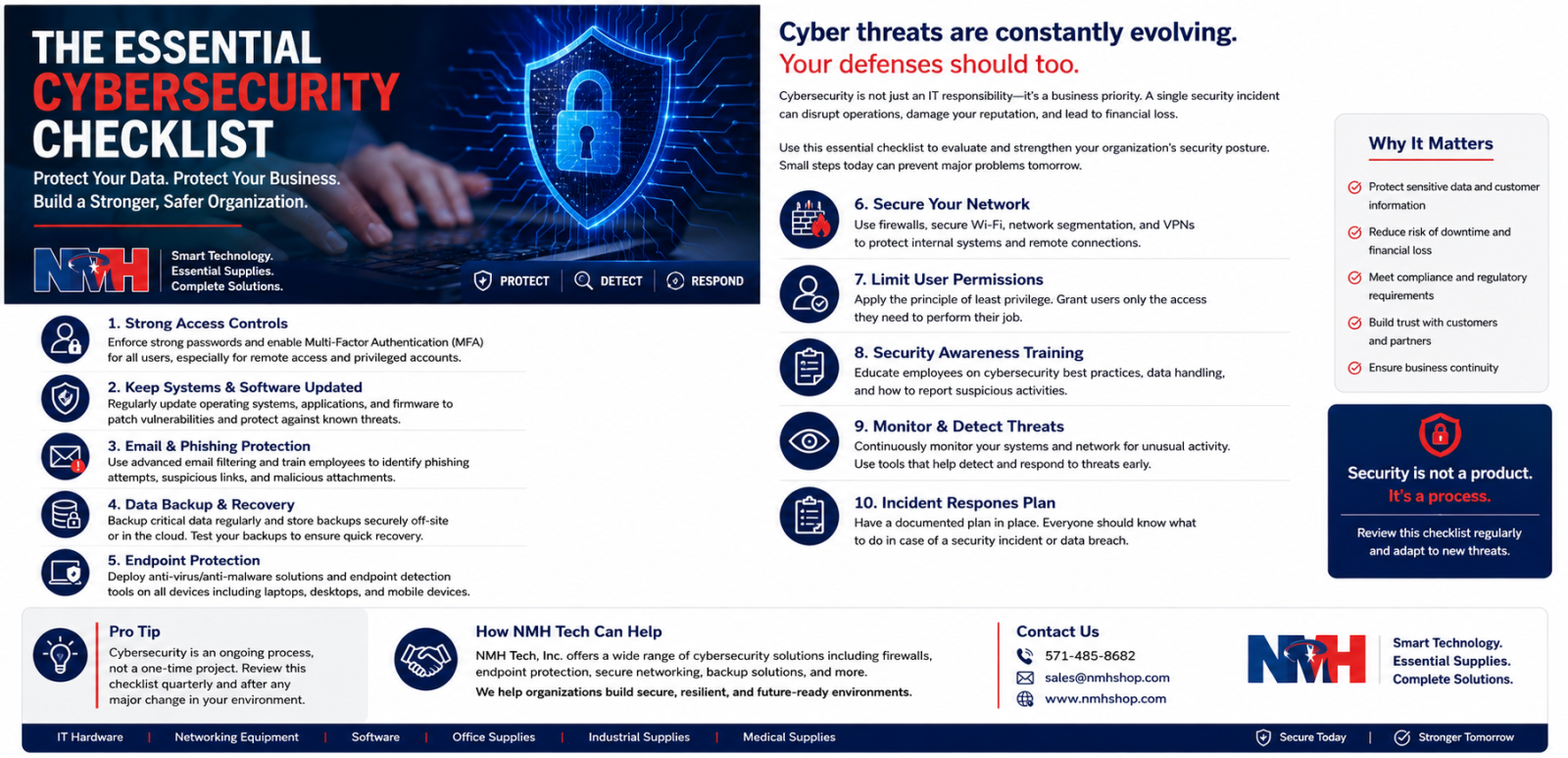
Cybersecurity is no longer only an IT responsibility. It is a business-continuity, financial, operational, legal, procurement, and reputational issue affecting organizations of every size.
A single compromised password, unpatched system, fraudulent email, exposed cloud account, insecure network device, or failed backup can interrupt operations, expose sensitive information, disrupt customer service, and create significant recovery costs.
Strong cybersecurity programs are built around consistent controls, properly configured technology, clear responsibilities, trained employees, reliable vendors, and tested recovery procedures.
This checklist provides a practical framework for businesses, government agencies, educational institutions, healthcare organizations, nonprofit organizations, industrial operations, and other professional buyers seeking to strengthen their cybersecurity posture.
1. Maintain an Accurate Technology Inventory
Organizations cannot secure technology they do not know they own.
Maintain an updated inventory of:
- Desktop computers
- Laptops
- Mobile devices
- Servers
- Storage systems
- Networking equipment
- Printers and multifunction devices
- Wireless access points
- Software applications
- Cloud platforms
- Email systems
- Security appliances
- Internet-connected equipment
- Backup systems
- Employee accounts
- Administrator accounts
Inventory records should identify the device owner, location, operating system, warranty status, security status, lifecycle stage, and business purpose.
Unmanaged devices and forgotten accounts can become security vulnerabilities.
2. Require Multifactor Authentication
Passwords alone should not be relied upon to protect important business systems.
Multifactor authentication should be enabled wherever supported, especially for:
- Business email
- Cloud applications
- Administrator accounts
- Banking and payment platforms
- Remote-access systems
- Customer databases
- Accounting applications
- File-storage systems
- Website administration
- Social media
- Vendor and distributor portals
MFA is particularly important for users with access to financial data, customer information, confidential records, administrative privileges, or security settings.
3. Strengthen Password Security
Organizations should establish clear password standards.
Recommended practices include:
- Use long and unique passwords
- Avoid predictable passwords
- Never share credentials by email or chat
- Use different passwords for different systems
- Change default passwords immediately
- Use an approved password manager
- Restrict administrator credentials
- Disable accounts promptly when employees leave
- Review shared accounts regularly
- Avoid using business passwords on personal websites
Password management should be treated as an organizational control rather than an individual preference.
4. Keep Systems Updated
Outdated software and firmware can contain known security vulnerabilities.
Organizations should regularly update:
- Operating systems
- Web browsers
- Business applications
- Endpoint-security software
- Firewalls
- Routers
- Switches
- Wireless access points
- Mobile devices
- Website platforms
- Plugins and extensions
- Database systems
- Backup software
- Printer firmware
- Internet-connected devices
Unsupported technology should be replaced, upgraded, or isolated because it may no longer receive security updates.
Technology-refresh planning should therefore be part of both cybersecurity strategy and B2B procurement planning.
5. Deploy Business-Grade Endpoint Protection
Business computers and supported mobile devices should use centrally managed endpoint protection.
Capabilities may include:
- Malware detection
- Ransomware protection
- Behavioral monitoring
- Web protection
- Device control
- Threat isolation
- Centralized alerts
- Remote investigation
- Automated response
- Security reporting
Consumer antivirus software may not provide adequate centralized management for organizations with multiple users, locations, or endpoints.
6. Secure the Network
The network connects users, devices, applications, cloud platforms, and critical business information.
Important controls include:
- Properly configured firewalls
- Secure wireless encryption
- Separate guest Wi-Fi
- Strong router credentials
- Disabled unused services
- Network segmentation
- Restricted administrative access
- Updated firmware
- Secure remote access
- Intrusion monitoring
- Logging and alerting
- Redundant connectivity where required
Sensitive business systems should not share unrestricted network access with guest devices, unmanaged equipment, or public users.
7. Protect Email Against Phishing and Fraud
Email remains a major attack channel for credential theft, malware, ransomware, and payment fraud.
Employees should be trained to recognize:
- Fake password-reset messages
- Fraudulent invoices
- Urgent payment requests
- Suspicious attachments
- Altered sender addresses
- Supplier impersonation
- Requests to change banking information
- Fake shipping notices
- Executive impersonation
- Unexpected document-sharing links
- Requests for confidential information
Banking or payment changes should be independently verified using a trusted contact method.
Email-security controls should also include:
- Spam filtering
- Malicious-link detection
- Attachment scanning
- Sender authentication
- Login monitoring
- Multifactor authentication
8. Maintain Reliable Backups
Backups are essential for recovery from:
- Ransomware
- Hardware failure
- Accidental deletion
- Theft
- Fire
- System corruption
- Cloud-account compromise
A reliable strategy should include:
- Multiple copies of critical data
- At least one protected off-site or cloud copy
- Restricted backup access
- Encryption
- Automated schedules
- Backup monitoring
- Multiple recovery versions
- Protection against unauthorized deletion
- Regular restoration testing
- Documented recovery procedures
A successful backup notification does not prove that the data can be restored. Recovery testing is essential.
9. Control User Access
Employees should receive only the system access necessary for their responsibilities.
Recommended practices include:
- Individual user accounts
- Role-based permissions
- Limited administrator privileges
- Approval for sensitive access
- Periodic access reviews
- Immediate removal of departing employees
- Temporary access for contractors
- Monitoring privileged accounts
- Restricted shared folders
- Separate administrative accounts
Administrator accounts should not be used for routine browsing, email, or general office work.
10. Secure Remote and Hybrid Work
Remote and hybrid environments require additional controls.
Organizations should establish requirements for:
- Approved business devices
- Secure remote-access tools
- VPN services
- Multifactor authentication
- Device encryption
- Automatic screen locking
- Mobile-device management
- Secure file sharing
- Approved communication platforms
- Lost-device reporting
- Restrictions on public Wi-Fi
Sensitive business systems should not be accessed from shared or public computers.
11. Encrypt Sensitive Data
Encryption can help protect information if a device, storage system, or communication channel is compromised.
Encryption should be considered for:
- Laptops
- Mobile devices
- Portable drives
- Backup systems
- Sensitive databases
- File transfers
- Confidential email
- Cloud storage
- Customer records
- Employee information
Encryption keys and recovery credentials must also be protected.
12. Establish Data-Handling Rules
Organizations should classify information based on sensitivity.
Common categories may include:
- Public
- Internal
- Confidential
- Regulated
- Highly sensitive
Policies should define:
- Who may access data
- Where it may be stored
- Whether it may be emailed
- Whether it may be uploaded to cloud or AI platforms
- Encryption requirements
- Retention requirements
- Secure deletion procedures
- Whether personal devices may store business information
- How printed records should be handled
Sensitive information may include customer records, employee data, contracts, financial information, pricing data, medical information, credentials, intellectual property, and internal communications.
13. Secure Cloud Applications
Cloud services must be configured and monitored carefully.
Organizations should review:
- Administrator accounts
- User permissions
- Multifactor authentication
- External sharing
- Public links
- Login activity
- Application integrations
- Data retention
- Backup availability
- Security alerts
- Former employee access
- Vendor security responsibilities
Cloud security is a shared responsibility between the provider and the customer.
14. Manage Mobile Devices
Mobile devices frequently contain email, customer information, authentication applications, files, and access to cloud services.
Recommended controls include:
- Strong passcodes
- Biometric protection
- Encryption
- Automatic locking
- Remote-wipe capability
- Operating-system updates
- Approved applications
- Restrictions on unknown app stores
- Backup controls
- Lost-device reporting
Organizations should clearly define whether personal devices may access business systems.
15. Control Removable Media
USB drives and portable storage can introduce malware or cause unauthorized data loss.
Policies should define:
- Whether removable media is allowed
- Who may use it
- Whether encryption is required
- How devices are scanned
- Whether personal media is prohibited
- How portable devices are tracked
- How obsolete media is destroyed
Highly sensitive environments may require removable storage to be disabled completely.
16. Protect Websites and Ecommerce Platforms
Business websites and online stores can be targeted through outdated software, insecure hosting, compromised administrator accounts, weak passwords, and vulnerable extensions.
Security controls should include:
- Secure hosting
- HTTPS encryption
- Strong administrator credentials
- Multifactor authentication
- Regular platform updates
- Plugin and extension reviews
- Website backups
- Firewall protection
- Malware scanning
- Restricted file permissions
- Secure payment processing
- Login-attempt monitoring
- Removal of inactive accounts
Website changes should be tested before deployment.
17. Review Vendors and Third Parties
Suppliers, software providers, contractors, consultants, cloud platforms, payment processors, and service providers may have access to systems or sensitive information.
Before granting access, evaluate:
- What information they can view
- Which systems they can access
- MFA requirements
- Monitoring procedures
- Access-removal processes
- Subcontractor use
- Security-incident notification
- Data-retention practices
- Contract termination procedures
Third-party access should be limited, documented, and reviewed periodically.
Vendor security should also be considered during the B2B procurement and supplier-selection process.
18. Train Employees Regularly
Technology alone cannot prevent every security incident.
Cybersecurity training should cover:
- Phishing
- Fraudulent messages
- Password security
- Multifactor authentication
- Safe browsing
- Remote work
- Mobile-device protection
- Data handling
- Secure file sharing
- Payment fraud
- Social engineering
- Incident reporting
- Approved AI use
Training should begin during onboarding and continue throughout the year.
19. Create an Incident-Response Plan
Organizations should prepare for security incidents before they occur.
An incident-response plan should identify:
- Who must be contacted
- Who has decision authority
- Which systems should be isolated
- How evidence will be preserved
- How technical, legal, and insurance advisers will be involved
- How employees or customers will be notified
- How operations will continue
- How backups will be restored
- How regulatory requirements will be addressed
- How the incident will be documented
The plan should be accessible even if normal business systems are unavailable.
20. Test Recovery Procedures
A documented plan is useful only if it works.
Organizations should periodically test scenarios such as:
- Ransomware
- Email compromise
- Stolen administrator credentials
- Lost laptops
- Website failures
- Cloud-service outages
- Accidental deletion
- Payment fraud
- Server failure
- Unauthorized access
Testing helps identify outdated procedures, inaccessible backups, unclear responsibilities, and unrealistic recovery expectations.
21. Monitor Security Alerts
Security systems generate valuable alerts, but those alerts must be reviewed.
Monitor for:
- Failed logins
- Unusual account activity
- New administrator accounts
- Malware detections
- Suspicious network traffic
- Security-setting changes
- Large file transfers
- Unexpected software installations
- Unknown devices
- Backup failures
- Cloud-sharing activity
- Website changes
Security tools provide limited value if no one reviews their alerts.
22. Separate Business and Personal Use
Business accounts and devices should primarily be used for authorized organizational activity.
Mixing business and personal use can increase risk from:
- Unsafe downloads
- Unapproved applications
- Password reuse
- Personal cloud storage
- Household access
- Insecure websites
- Loss of organizational records
Critical company accounts should be controlled by the organization rather than tied solely to an employee's personal email or telephone number.
23. Prepare for Employee Departures
Access should be removed promptly when employees, contractors, or administrators leave.
Offboarding should include:
- Disabling accounts
- Revoking remote access
- Changing shared credentials
- Recovering equipment
- Removing email forwarding
- Transferring business files
- Removing cloud permissions
- Recovering security keys
- Removing vendor-portal access
- Reviewing recent account activity
Delayed offboarding creates unnecessary risk.
24. Maintain Cyber Insurance and Documentation
Cyber insurance may help organizations manage some financial consequences of security incidents.
Organizations should review:
- Coverage limits
- Ransomware provisions
- Business-interruption coverage
- Legal expenses
- Notification costs
- Incident-response services
- Vendor-related incidents
- Exclusions
- Required security controls
- Reporting deadlines
Organizations should maintain documentation of:
- Cybersecurity policies
- Employee training
- Backups
- Access reviews
- Incident procedures
- Technology inventories
- Security controls
Customers, insurers, regulators, auditors, or government contracting partners may request evidence of cybersecurity practices.
Essential B2B Cybersecurity Checklist
Your organization should be able to confirm that:
- Technology assets are inventoried
- Multifactor authentication is enabled
- Strong passwords are required
- Systems receive security updates
- Business-grade endpoint protection is deployed
- Networks are securely configured
- Employees receive cybersecurity training
- Critical data is backed up
- Backups are tested
- Sensitive data is encrypted
- User access is role-based
- Former employee access is promptly removed
- Remote work is secured
- Cloud-sharing settings are controlled
- Mobile devices are protected
- Vendor access is monitored
- Websites and ecommerce systems are maintained
- Security alerts are reviewed
- An incident-response plan exists
- Recovery procedures are tested
- Technology replacement and lifecycle needs are planned
Cybersecurity is not a one-time project. It requires continuous monitoring, updated technology, reliable suppliers, documented procedures, and informed employees.
How NMH Tech Supports B2B Cybersecurity Readiness
Founded in 2014, NMH Tech, Inc. supports businesses, government agencies, educational institutions, healthcare organizations, government contractors, and other professional buyers with technology products needed to build and maintain secure IT environments.
Our cybersecurity-related portfolio includes:
- Business computers and workstations
- Servers and storage systems
- Firewalls and security appliances
- Routers, switches, and wireless equipment
- Endpoint-security software
- Backup and recovery solutions
- Cloud and productivity software
- Multifactor-authentication products
- Power-protection equipment
- Monitors and peripherals
- Secure mobile and remote-work solutions
- Related IT hardware and accessories
NMH Tech supports RFQs, Purchase Orders, bulk and volume purchasing, technology refreshes, infrastructure upgrades, security-hardware sourcing, recurring requirements, and project-based procurement.
NMH Tech is a certified Virginia Small Business, NATO Basic Ordering Agreement holder, AbilityOne distributor, and TIPS contract holder, with previous experience as a GSA Multiple Award Schedule contract holder.
For B2B pricing, product availability, bulk requirements, or a Request for Quote, contact:
NMH Tech, Inc.
Phone: 571-485-8682
Email: sales@nmhshop.com
B2B Technology. Essential Supplies. Complete Procurement Solutions.