Free Standard Shipping on Eligible U.S. Orders Over $500.•B2B Volume Bulk Order Pricing•Fast, Reliable Delivery Across the U.S.•Free Standard Shipping on Eligible U.S. Orders Over $500.•B2B Volume Bulk Order Pricing•Fast, Reliable Delivery Across the U.S.•
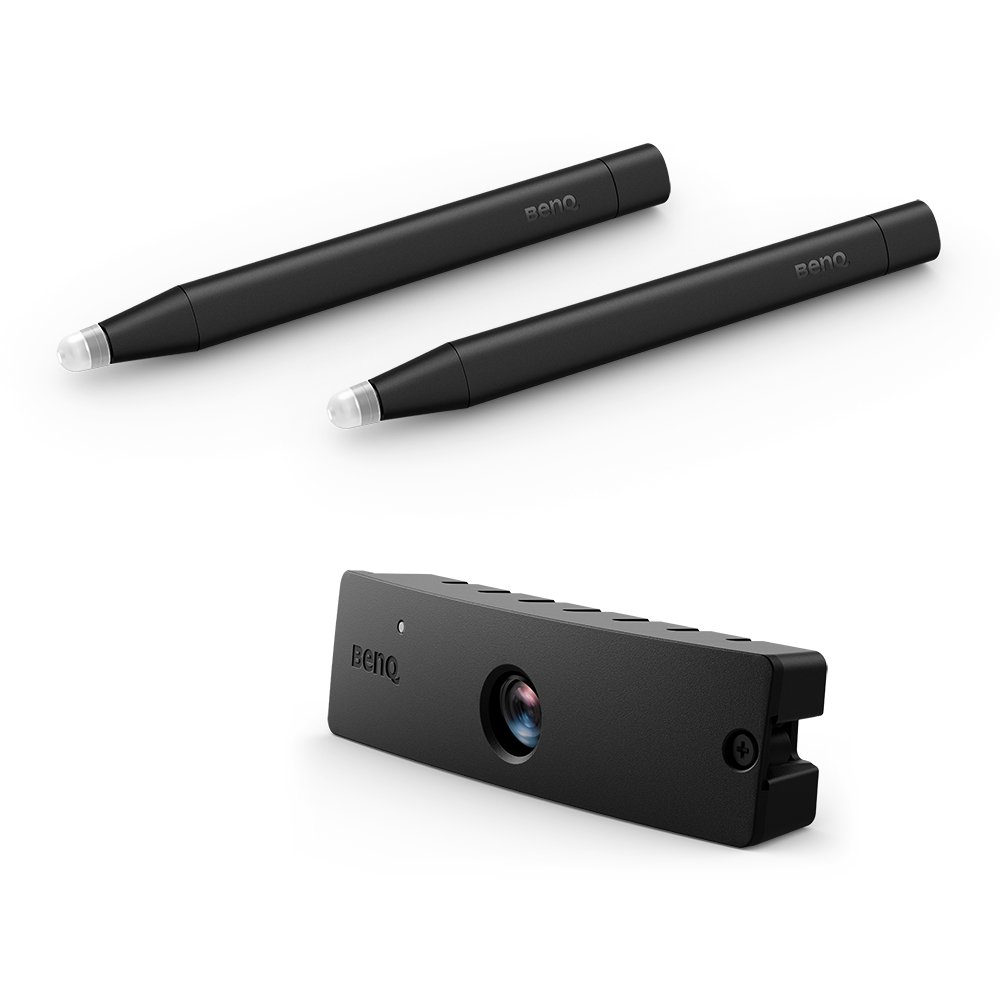
Dual Screen with Multiple Touch Capabilities BenQ’s dual screen feature allows teachers to create immersive learning experiences by seamlessly connecting two screens. In addition, you can use PointWrite™ infrared pen or pair the system with PointWrite™ Touch* to equip a fully scalable and forward-thinking classroom. The multi-touch capabilities, which support Windows7 or above and future applications, are enabled by QWrite™** which supports multi-touch capabilities up to 10 points to encourage students to collaborate and create ideas together using one big screen. Students can now watch videos and take notes simultaneously using easy and intuitive technology.
*Dual Screen need the additional driver, please go download page **Finger mode requires pairing with optional PointWrite™ touch module PT20. ***QWrite™ is BenQ exclusive annotation software is compatible with BenQ PointWrite™ kit.
Intuitive Setup for Interactivity Easy 1-2-3 PointWrite™ Set Up 1.Insert PW30U* PointWrite™ kit (the camera with 60fps infrared sensor) into the projector. 2.Plug the USB cable to connect the projector to the computer, and execute PointWrite™ setup program and start automatic calibration. 3.Enjoy smoothly writing with ultra-fast 16ms response time via QWrite™ software on any surface along with PointWrite™ Pen or PointWrite™ Touch Module.
*PW30U also support manual calibration with improved accuracy
Effective Auto Calibration with User-Friendly Configuration Interface PW30U PointWrite™ kit supports auto calibration through a user-friendly configuration interface without complicated setup. The interactive sensor also guarantees reliable auto-calibration in normal ambient lighting without interference.
Hassle Free Interactive Teaching Without Driver Installation One-time driver setup for initial alignment calibration PointWrite™ kit increases convenience upon the first PointWrite™ kit use, and subsequent users can plug and play to start the interaction quickly without driver installation to immediately start interactive teaching sessions anytime.
Advanced Light Interference Performance PW30U PointWrite™ kit features improved light interference performance with new infrared technology. Equipped with enhanced anti-light interference level, PW30U ensures optimal usability under brighter sunshine in pen mode or finger mode*.
Windows Gesture Support PointWrite™ projectors support intuitive Windows gestures such as zooming in and out or scrolling while browsing webpages, pictures, or Google Maps. All multi-touch commands and gestures are supported for Windows8 or above and future applications.
New Design for Interactive Pen to Save Battery Lifetime PointWrite Interactive Pen Gen2 provides auto power off function. When keep pressing the pen tip around 30 sec, the pen power will be disable automatically.
Product Specifications
Manufacturer
BENQ BES PROJECTORS
Manufacturer Part Number
5A.JJR26.11E
Barcode
0840046047818
Brand Name
BenQ
Product Name
BenQ PW31U Interactive kit
Mfr. Part Number
5A.JJR26.11E
Barcode
0840046047818
Features
Product type
Interactive kit
Brand compatibility
Benq
Product colour
Black
Ports interfaces
Connectivity technology
Wireless
Interface
Infrared (IR)
Software
Windows operating systems supported
Yes
Mac operating systems supported
Yes
Packaging content
Number of stylus pens
2
Brand
BenQ
Availability
In Stock
Price Currency
USD
Category
Projectors Screens
Customer reviews
No reviews yet. If you have bought this,
yours would be the first.
NMH Tech, Inc. uses cookies and similar technologies to improve website functionality, enhance security, remember preferences, analyze site usage, and support our B2B ecommerce services. By continuing to use this website, you consent to our use of cookies in accordance with our Privacy Policy. Learn more